ImageAI Video Generator

Free In-Browser AI VideoGenerator Studio

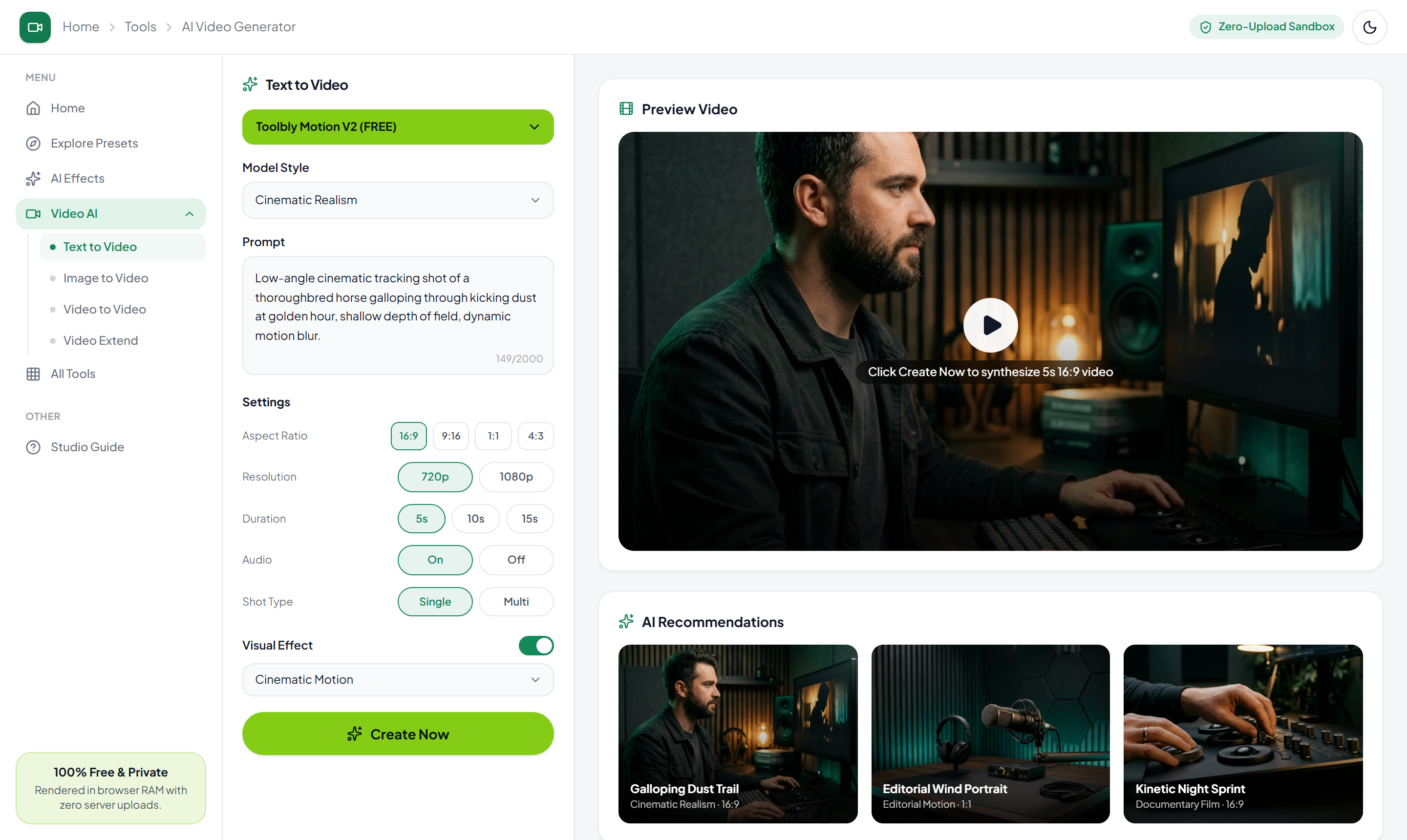
Create and export 720p or 1080p videosfrom prompts or images in browser RAM.

Loading in-browser workspace...
Engine Features

Engineered for speed, precision, and total privacy

Text & Image to Video

Turn descriptive prompts or uploaded PNG/JPG frames into animated motion sequences with depth lighting.

Multi-Ratio Export

Switch instantly between 16:9, 9:16, 1:1, and 4:3 aspect ratios for YouTube, Shorts, Reels, or feeds.

Single & Multi-Shot Motion

Choose smooth continuous camera pans or dynamic multi-cut sequences with visual effect presets.

Built-In WebAudio Synth

Toggle procedural ambient soundtracks on or off and mux audio directly into the exported video.

Quick Tutorial

How to use AI Video Generator in four steps

1

Select Video Mode

Open the studio and choose Text to Video, Image to Video, Video to Video, or Video Extend.

2

Write Your Prompt

Describe your scene or pick one of the AI Recommendations presets, and upload media if animating an image or clip.

3

Configure Settings

Pick your Aspect Ratio (16:9, 9:16, 1:1, 4:3), Resolution (720p or 1080p), Duration (5s, 10s, 15s), Audio, and Shot Type.

4

Create & Download

Click Create Now to synthesize frames in browser memory, preview playback, and download your video file.

Debugging Guide

Four common pitfalls and how to avoid them

1. Wrong Aspect Ratio for Target Platform

Exporting 16:9 landscape video for vertical mobile feeds leaves large black bars.

Incorrect16:9 for vertical Shorts
Correct9:16 for vertical, 16:9 for web

2. Uploading Private Footage to Cloud Queues

Cloud video generators store personal photos and unreleased clips on third-party servers.

IncorrectRemote cloud upload
Correct100% Local Browser RAM

3. Skipping Visual Effect Presets

Leaving raw footage ungraded misses cohesive lighting and contrast across cuts.

IncorrectUnstyled flat frames
CorrectMatched effect + palette

4. Using Static Single Cuts for Dynamic Scenes

Longer 10s or 15s clips benefit from Multi-shot pacing to hold viewer attention.

IncorrectStatic 15s frame
CorrectMulti-shot camera motion
Architecture Guide5 min readImage Engineering

Client-Side Video Synthesis: Canvas 2D, WebAudio, and MediaRecorder

How in-browser frame synthesis, multi-shot camera motion, and procedural audio work without remote GPU queues.

What can you create with the Toolbly AI Video Generator Studio?

Toolbly AI Video Generator is a free, zero-upload three-pane studio supporting Text to Video, Image to Video, Video to Video, and Video Extend workflows. You can configure 16:9, 9:16, 1:1, or 4:3 aspect ratios, 720p or 1080p resolution, 5s to 15s durations, Single or Multi-shot camera motion, and optional WebAudio soundtracks, then download the rendered video directly from browser memory.

Key Architectural Takeaways
  • Four Studio Modes: Switch between Text to Video, Image to Video, Video to Video, and Video Extend in one workspace.
  • Zero Server Uploads: Source photos, video clips, and rendered frames stay inside your browser RAM with zero cloud transit.
  • Flexible Aspect Ratios: Export 16:9 widescreen, 9:16 vertical Shorts/Reels, 1:1 square, or 4:3 frames at 720p or 1080p.

1. Four Workflows Inside One Three-Pane Studio

The Toolbly AI Video Studio organizes navigation, generation controls, and live playback into a clean three-pane interface. Use Text to Video for prompt-driven atmospheric scenes, Image to Video to animate uploaded photos with parallax motion, Video to Video to restyle clips with visual effects, or Video Extend to build longer sequences.

2. In-Browser Synthesis vs. Cloud Render Queues

Traditional AI video platforms require accounts, credit packs, and remote GPU queues. Toolbly synthesizes motion frames, lighting sweeps, kinetic particles, and procedural WebAudio directly in your browser using Canvas 2D and MediaRecorder, giving you instant preview and download with zero server uploads.

Toolbly Browser Studio

Instant client-side synthesis with 4 modes, 4 aspect ratios, optional WebAudio, and zero watermarks or uploads.

Cloud Render Platforms

Require paid credits, queue wait times, and uploading your source images or videos to external servers.

Common Questions

Frequently Asked Questions

Yes. All four studio modes, aspect ratios, visual effects, and video downloads are 100% free with no watermarks or account sign-up required.
Explore More

Related Image & Media Utilities

View All 26 Tools
4.9/5
CreatorDeveloperDesignerStudent
120K+

Over 120,000+ developers, designers, and
creators choose Toolbly daily

Empowering Your Daily
Creative Workflow

Trust us to deliver cutting-edge in-browser speed, complete local privacy, and precision utilities, all designed to help you build, format, and convert effortlessly.